
Intégration de LDAP dans une application Spring Boot avec Spring Security
De nombreuses applications modernes doivent gérer l’authentification des utilisateurs et leurs autorisations. Plutôt que de recréer un système interne, les entreprises centralisent souvent cette gestion via un annuaire LDAP. Dans cet article, nous allons voir comment configurer une application Spring Boot pour s’appuyer sur LDAP.
Nous utiliserons un annuaire LDAP embarqué avec UnboundID pour simplifier la mise en place, mais la configuration pourra facilement être adaptée à un annuaire d’entreprise (OpenLDAP, Active Directory, etc.).
Qu’est-ce que LDAP ?
LDAP (Lightweight Directory Access Protocol) est un protocole standardisé permettant d’accéder à un annuaire : une base de données hiérarchique contenant des informations sur des utilisateurs, groupes, ressources ou services.
- L’arborescence LDAP est organisée sous forme de DN (Distinguished Name), comme des chemins uniques.
Exemple :cn=Alice Martin,ou=users,dc=example,dc=com. - Chaque entrée est composée d’attributs (ex. :
uid,mail,userPassword). - Les groupes permettent de regrouper des utilisateurs pour leur attribuer des rôles.
C’est un système efficace, éprouvé et standardisé, ce qui en fait un choix naturel pour gérer l’authentification et l’autorisation dans un contexte professionnel.
⚖️ Avantages et inconvénients de LDAP
➕ Avantages
- Centralisation : tous les utilisateurs et groupes sont gérés à un seul endroit.
- Interopérabilité : supporté par de nombreuses solutions (Spring, Java EE, Apache, Microsoft, etc.).
- Sécurité : authentification forte et possibilité de chiffrer les communications (LDAPS).
- Scalabilité : adapté aux environnements avec des milliers d’utilisateurs.
➖ Inconvénients
- Complexité : la structure hiérarchique et les schémas LDAP nécessitent une bonne compréhension pour éviter les erreurs.
- Courbe d’apprentissage : écrire des filtres de recherche LDAP peut être déroutant au début.
- Maintenance : l’administration de l’annuaire requiert des compétences spécifiques.
Les dépendances Maven
Dans notre fichier pom.xml, nous allons rajouter les dépendances suivantes :
<dependencies>
    <dependency>
        <groupId>org.springframework.boot</groupId>
        <artifactId>spring-boot-starter-validation</artifactId>
    </dependency>
    <dependency>
        <groupId>org.springframework.boot</groupId>
        <artifactId>spring-boot-starter-thymeleaf</artifactId>
    </dependency>
    <dependency>
        <groupId>org.thymeleaf.extras</groupId>
        <artifactId>thymeleaf-extras-springsecurity6</artifactId>
    </dependency>
    <dependency>
        <groupId>org.springframework.boot</groupId>
        <artifactId>spring-boot-starter-data-ldap</artifactId>
    </dependency>
    <dependency>
        <groupId>org.springframework.security</groupId>
        <artifactId>spring-security-ldap</artifactId>
    </dependency>
    <dependency>
        <groupId>com.unboundid</groupId>
        <artifactId>unboundid-ldapsdk</artifactId>
    </dependency>
</dependencies>
- spring-boot-starter-data-ldap et spring-security-ldap pour gérer l’authentification LDAP.
- unboundid-ldapsdk pour embarquer un serveur LDAP mémoire, idéal pour les tests et les démos.
- thymeleaf + thymeleaf-extras-springsecurity6 pour intégrer la sécurité dans les vues.
Le fichier LDIF
Pour faciliter les tests, nous allons initialiser notre annuaire LDAP avec un fichier LDIF (LDAP Data Interchange Format). Ce fichier permet de décrire de manière déclarative les unités organisationnelles, les utilisateurs et les groupes.
Voici le contenu du fichier data.ldif que nous allons utiliser :
dn: ou=users,dc=example,dc=com
objectClass: organizationalUnit
ou: users

# Admin user for the application to bind with
dn: cn=admin,dc=example,dc=com
objectClass: simpleSecurityObject
objectClass: organizationalRole
cn: admin
userPassword: admin-password
description: LDAP administrator

# Test users
dn: cn=Alice Martin,ou=users,dc=example,dc=com
objectClass: inetOrgPerson
cn: Alice Martin
sn: Martin
givenName: Alice
uid: amartin
mail: alice.martin@example.com
userPassword: password

dn: cn=Bob Dupuis,ou=users,dc=example,dc=com
objectClass: inetOrgPerson
cn: Bob Dupuis
sn: Dupuis
givenName: Bob
uid: bdupuis
mail: bob.dupuis@example.com
userPassword: password

# --- Groups --- #
dn: ou=groups,dc=example,dc=com
objectClass: organizationalUnit
ou: groups

dn: cn=ADMINS,ou=groups,dc=example,dc=com
objectClass: groupOfUniqueNames
cn: ADMINS
uniqueMember: cn=Alice Martin,ou=users,dc=example,dc=com

dn: cn=USERS,ou=groups,dc=example,dc=com
objectClass: groupOfUniqueNames
cn: USERS
uniqueMember: cn=Alice Martin,ou=users,dc=example,dc=com
uniqueMember: cn=Bob Dupuis,ou=users,dc=example,dc=com
Ce fichier crée :
- Une unité organisationnelle
userset une unitégroups. - Un administrateur LDAP
admin. - Deux utilisateurs de test : Alice Martin et Bob Dupuis.
- Deux groupes :
ADMINS(qui contient Alice) etUSERS(qui contient Alice et Bob).
Classe de configuration Spring Security
Démarrage du container LDAP embarqué
@Bean
public UnboundIdContainer ldapContainer() {
    UnboundIdContainer container = new UnboundIdContainer("dc=example,dc=com", "classpath:users.ldif");
    container.setPort(0);
    return container;
}
Ici, nous configurons un serveur LDAP embarqué basé sur UnboundID, directement en mémoire.
Ce serveur est initialisé avec :
- Un suffixe de base :
"dc=example,dc=com", qui définit la racine de notre annuaire LDAP. - Un fichier LDIF :
"classpath:users.ldif", qui contient des entrées préchargées (utilisateurs, groupes, mots de passe, etc.).
L’appel à setPort(0) indique que le serveur doit choisir automatiquement un port disponible sur la machine, ce qui évite les conflits lors de l’exécution des tests en parallèle ou sur des environnements différents.
Contexte LDAP
@Bean
public LdapContextSource contextSource(UnboundIdContainer container) {
    LdapContextSource contextSource = new LdapContextSource();
    contextSource.setUrl("ldap://localhost:" + container.getPort());
    contextSource.setUserDn("cn=admin,dc=example,dc=com");
    contextSource.setPassword("admin-password");
    contextSource.setBase("dc=example,dc=com");
    contextSource.afterPropertiesSet();
    return contextSource;
}
Cette méthode configure le contexte LDAP pour Spring Security :
**setUrl**: adresse du serveur LDAP (ici, l’instance locale viaUnboundIdContainer).**setUserDn**: DN du compte admin utilisé pour interroger l’annuaire.**setPassword**: mot de passe associé (à externaliser en pratique).**setBase**: point de départ des recherches (dc=example,dc=com).**afterPropertiesSet**: valide et initialise l’objet avant usage.
Sécurité HTTP
Par défaut, Spring Security propose un formulaire de connexion générique (simple mais efficace) permettant aux utilisateurs de s’authentifier.
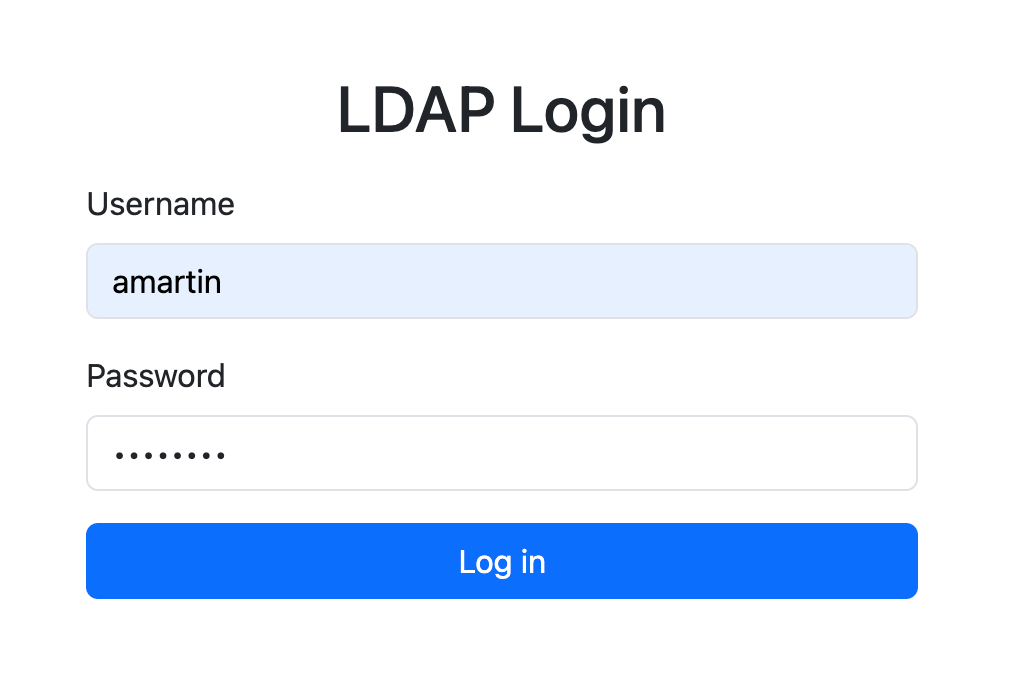
Dans notre cas, nous avons choisi de surcharger ce comportement afin d’utiliser notre propre page de connexion personnalisée (/login) et de rediriger l’utilisateur vers une page d’accueil (/home) en cas de succès.
@Bean
public SecurityFilterChain securityFilterChain(HttpSecurity http) throws Exception {
    http
            .authorizeHttpRequests(authorize -> authorize
                    .requestMatchers("/css/**", "/js/**").permitAll()
                    .anyRequest().authenticated()
            )
            .formLogin(form -> form
                    .loginPage("/login")
                    .defaultSuccessUrl("/home", true)
                    .permitAll()
            )
            .logout(logout -> logout
                    .logoutSuccessUrl("/login?logout")
                    .permitAll()
            )
            .exceptionHandling(exception -> exception.accessDeniedPage("/access-denied"));
    return http.build();
}
loginPage("/login"): remplace le formulaire par défaut fourni par Spring Security par une page personnalisée. Cela permet d’intégrer notre propre design et d’améliorer l’expérience utilisateur.defaultSuccessUrl("/home", true): définit la page vers laquelle l’utilisateur est redirigé une fois connecté avec succès.permitAll(): autorise tout le monde à accéder à la page de login et au mécanisme de logout, sans restriction.exceptionHandling(): si l’utilisateur n’est pas autorisé, redirection vers une page d’erreur.
Authentification via LDAP
@Bean
AuthenticationManager authenticationManager(LdapContextSource contextSource) {
    LdapBindAuthenticationManagerFactory factory = new LdapBindAuthenticationManagerFactory(contextSource);
    factory.setUserSearchFilter("(uid={0})");
    factory.setUserSearchBase("ou=users");

    DefaultLdapAuthoritiesPopulator authoritiesPopulator = new DefaultLdapAuthoritiesPopulator(contextSource, "ou=groups");
    authoritiesPopulator.setGroupSearchFilter("uniqueMember={0}");
    factory.setLdapAuthoritiesPopulator(authoritiesPopulator);

    return factory.createAuthenticationManager();
}
- userSearchFilter → définit comment retrouver un utilisateur (
uid={0}→ login saisi dans le formulaire). - authoritiesPopulator → récupère les rôles depuis les groupes LDAP (via
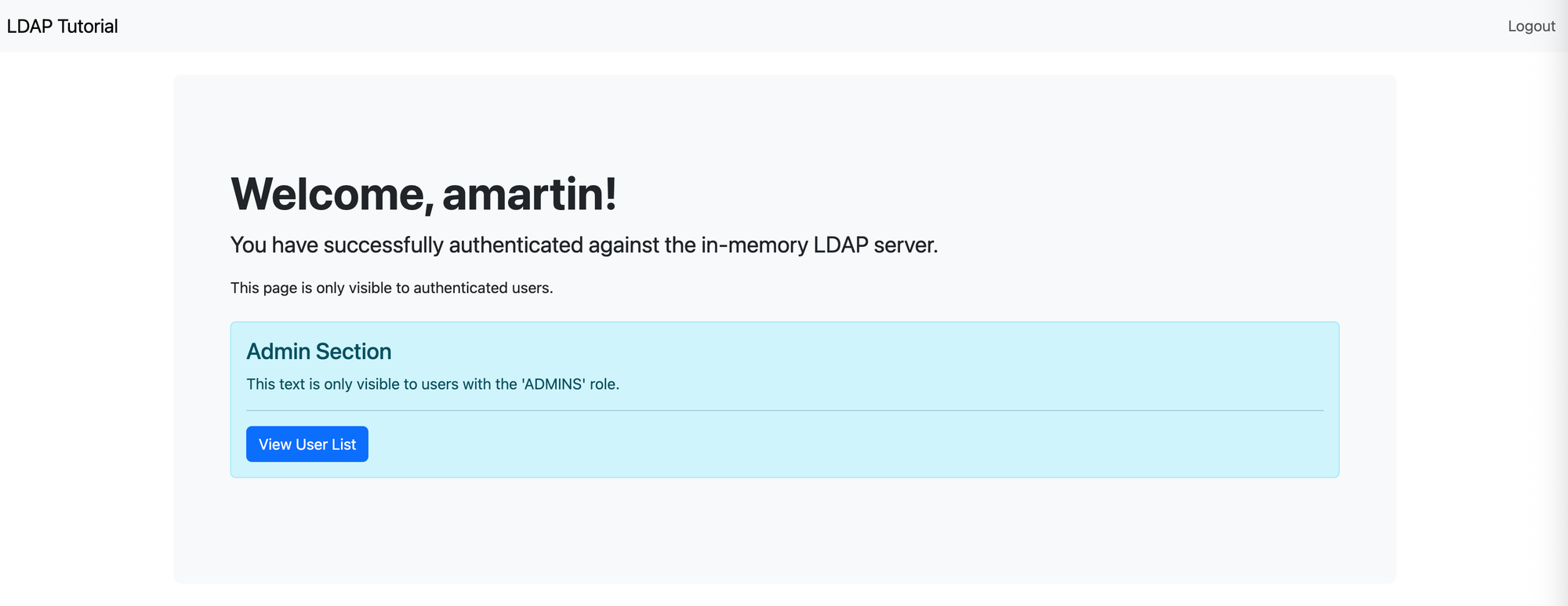
uniqueMember). - Résultat : si Alice est dans le groupe ADMINS, elle aura automatiquement le rôle ROLE_ADMINS.
Le service LDAP
Ce service encapsule l’accès à LDAP via LdapTemplate.
Recherche de tous les utilisateurs
public List<UserDto> findAllUsers() {
    return ldapTemplate.search(
            "ou=users",
            "(objectclass=inetOrgPerson)",
            (ContextMapper<UserDto>) ctx -> {
                DirContextAdapter adapter = (DirContextAdapter) ctx;
                String userDn = adapter.getNameInNamespace();
                List<String> roles = findUserRoles(userDn);
                return new UserDto(
                        adapter.getStringAttribute("cn"),
                        adapter.getStringAttribute("uid"),
                        adapter.getStringAttribute("mail"),
                        roles
                );
            }
    );
}

private List<String> findUserRoles(String userDn) {
    return ldapTemplate.search(
            "ou=groups",
            "(&(objectclass=groupOfUniqueNames)(uniqueMember=" + LdapEncoder.filterEncode(userDn) + "))",
            (AttributesMapper<String>) attrs -> (String) attrs.get("cn").get()
    );
}
Création d’un utilisateur
public void createUser(NewUserDto userDto) {
    Name dn = LdapNameBuilder.newInstance()
            .add("ou", "users")
            .add("cn", userDto.getFullName())
            .build();

    DirContextAdapter context = new DirContextAdapter(dn);
    context.setAttributeValues("objectclass", new String[]{"top", "inetOrgPerson"});
    context.setAttributeValue("cn", userDto.getFullName());
    String[] names = userDto.getFullName().split(" ");
    context.setAttributeValue("sn", names.length > 1 ? names[names.length - 1] : userDto.getFullName());
    context.setAttributeValue("uid", userDto.getUid());
    context.setAttributeValue("mail", userDto.getEmail());
    context.setAttributeValue("userPassword", userDto.getPassword());

    ldapTemplate.bind(context);
}
Ici, nous ajoutons l’utilisateur directement dans ou=users.
Ajout d’un utilisateur dans un groupe
public void addUserToGroup(String userFullName, String groupName) {
    Name userDn = LdapNameBuilder.newInstance("dc=example,dc=com")
            .add("ou", "users")
            .add("cn", userFullName)
            .build();

    Name groupDn = LdapNameBuilder.newInstance()
            .add("ou", "groups")
            .add("cn", groupName)
            .build();

    DirContextOperations group = ldapTemplate.lookupContext(groupDn);
    group.addAttributeValue("uniqueMember", userDn.toString());
    ldapTemplate.modifyAttributes(group);
}
Dans toutes ces méthode nous utilisons ldapTemplate, une API fournit par Spring qui nous évite de manipuler directement des requêtes LDAP brutes.
Le contrôleur
@Controller
public class ApiController {

    private final LdapService ldapService;

    public ApiController(LdapService ldapService) {
        this.ldapService = ldapService;
    }

    @GetMapping("/")
    public String root() {
        return "redirect:/home";
    }

    @GetMapping("/home")
    public String home() {
        return "home";
    }

    @GetMapping("/login")
    public String login() {
        return "login";
    }

    @GetMapping("/access-denied")
    public String accessDenied() {
        return "access-denied";
    }

    @PreAuthorize("hasRole('ADMINS')")
    @GetMapping("/admin/users")
    public String listUsers(Model model) {
        model.addAttribute("users", ldapService.findAllUsers());
        if (!model.containsAttribute("newUser")) {
            model.addAttribute("newUser", new NewUserDto());
        }
        return "admin/user-list";
    }

    @PreAuthorize("hasRole('ADMINS')")
    @PostMapping("/admin/users/create")
    public String createUser(@Valid @ModelAttribute("newUser") NewUserDto newUser, BindingResult bindingResult, RedirectAttributes redirectAttributes) {
        if (bindingResult.hasErrors()) {
            redirectAttributes.addFlashAttribute("org.springframework.validation.BindingResult.newUser", bindingResult);
            redirectAttributes.addFlashAttribute("newUser", newUser);
            return "redirect:/admin/users";
        }

        try {
            ldapService.createUser(newUser);
            if (newUser.getRoles() == null || newUser.getRoles().isEmpty()) {
                // By default, add to USERS group if no role is selected
                ldapService.addUserToGroup(newUser.getFullName(), "USERS");
            } else {
                for (String role : newUser.getRoles()) {
                    ldapService.addUserToGroup(newUser.getFullName(), role);
                }
            }
            redirectAttributes.addFlashAttribute("successMessage", "User " + newUser.getFullName() + " created successfully!");
        } catch (Exception e) {
            redirectAttributes.addFlashAttribute("errorMessage", "Error creating user: " + e.getMessage());
        }

        return "redirect:/admin/users";
    }
}
Ici nous utilisons Thymeleaf comme moteur de template et de rendu de nos vues HTML.
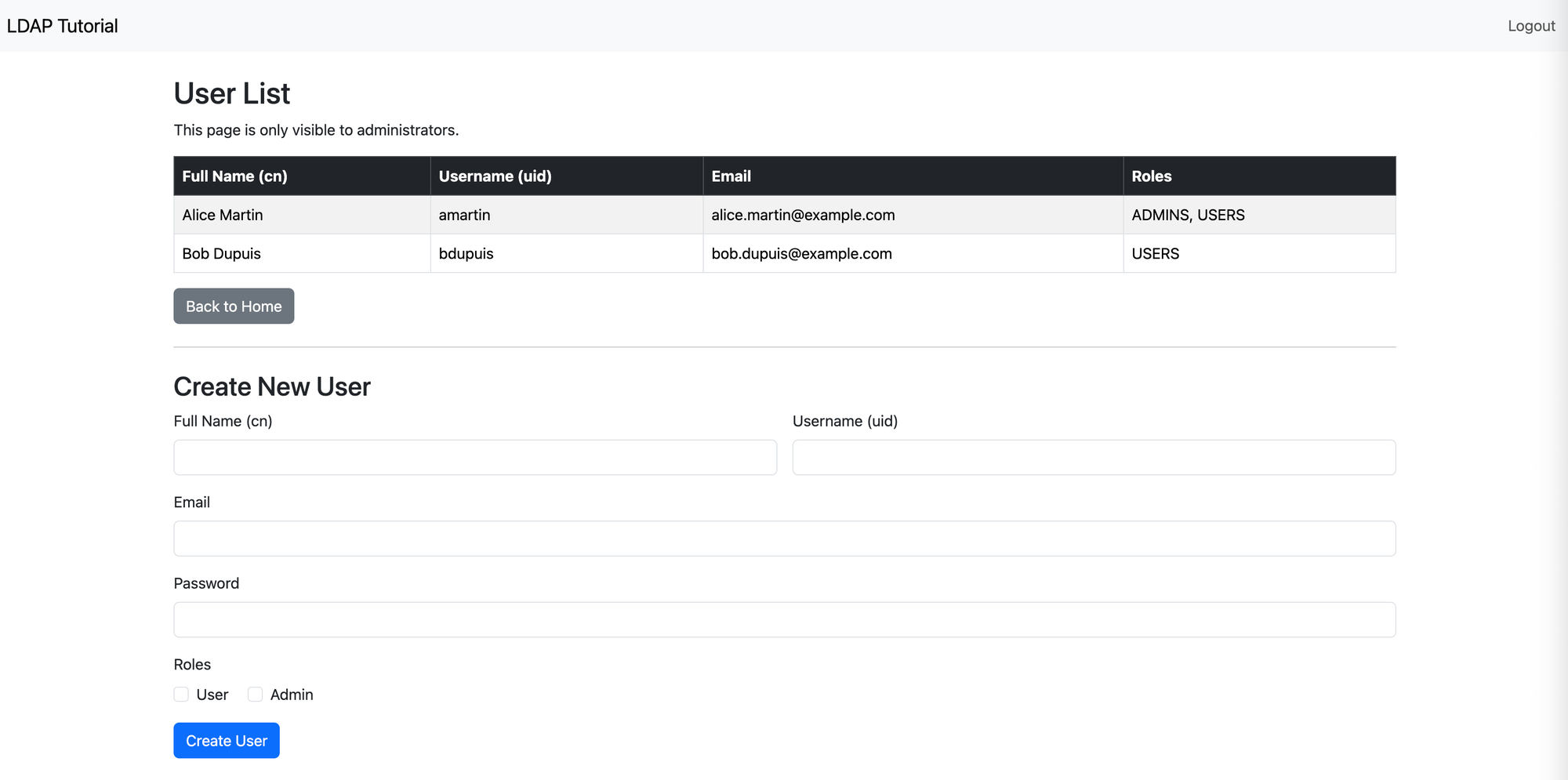
Nous protégeons également nos endpoints listUsers et createUser aux utilisateurs ayant le rôle ADMIN via l’annotation @PreAuthorize("hasRole('ADMINS')") .

Conclusion
L’intégration de LDAP avec Spring Boot et Spring Security permet de centraliser la gestion des utilisateurs et des rôles, tout en s’appuyant sur un protocole standardisé et éprouvé.
Grâce à cette configuration :
- Nous pouvons authentifier les utilisateurs directement via l’annuaire LDAP.
- Les rôles et groupes sont exploités pour gérer finement les autorisations.
- Il est possible de personnaliser l’expérience utilisateur, par exemple en remplaçant le formulaire de login par défaut par une page sur mesure.
- Le serveur LDAP embarqué (UnboundID) facilite le développement et les tests sans dépendre d’une infrastructure externe.
En résumé, cette approche combine sécurité, standardisation et flexibilité, tout en restant réplicable dans un environnement réel (OpenLDAP ou Active Directory).